 tidlet
Copy from Claude Code. Paste it clean.
Copy part of a Claude Code answer in your terminal and it comes with a 2-space margin, spaces padding every line to the terminal's width, ⏺ markers and line breaks wherever the window ended. CleanCopy fixes the copy as you make it, so it pastes the way it reads. Codex and Gemini CLI too, plus ChatGPT answers without the ** and ###, links without tracking and commands that run.
macOS 13 or later · Apple silicon & Intel · one key, 2 Macs
How it works
Three steps, most of them yours.
- Copy in your terminal
Select part of Claude Code's answer and press ⌘C, the way you already do. Terminal, iTerm2, Ghostty, Warp and more.
- CleanCopy tidies it
In a blink, on your Mac: the margin, the padding, the ⏺ and ⎿ markers and the box borders go, and lines broken at the terminal's edge join back up.
- Paste anywhere
A doc, a ticket, a chat, back into the shell. Changed your mind? Put Back Original restores exactly what you copied.
⏺ The deploy copied the old .dmg
  because the build hadn't finished
  signing it. Run make build first,
  then make deploy-web.

❯
Paste here
The deploy copied the old .dmg because the build hadn't finished signing it. Run make build first, then make deploy-web.
A closer look
The whole app, screen by screen.
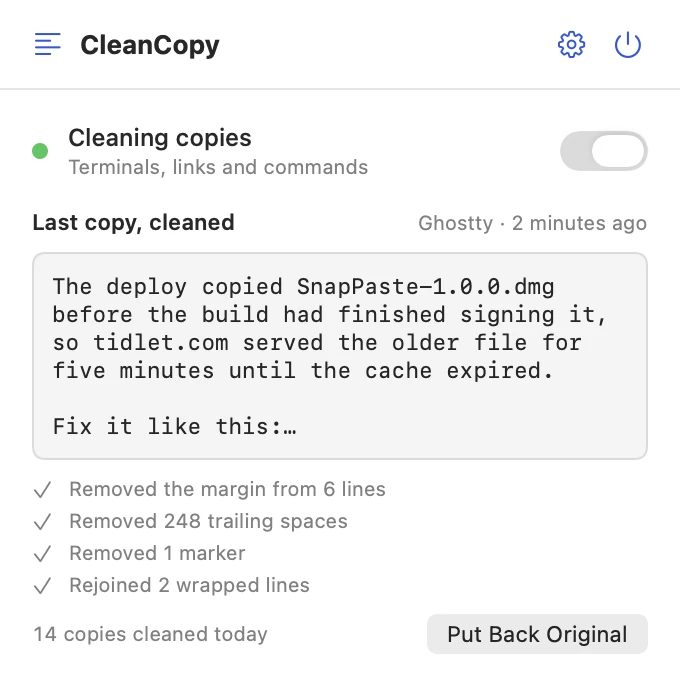
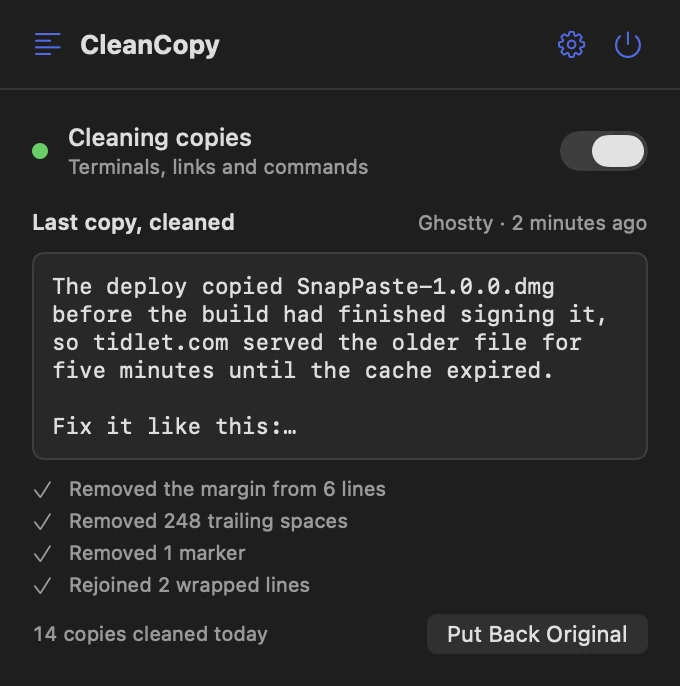
These are real screens from CleanCopy, in light and dark to match your Mac. In Tidlet they open from the Tidlet icon in your menu bar.
See what changed
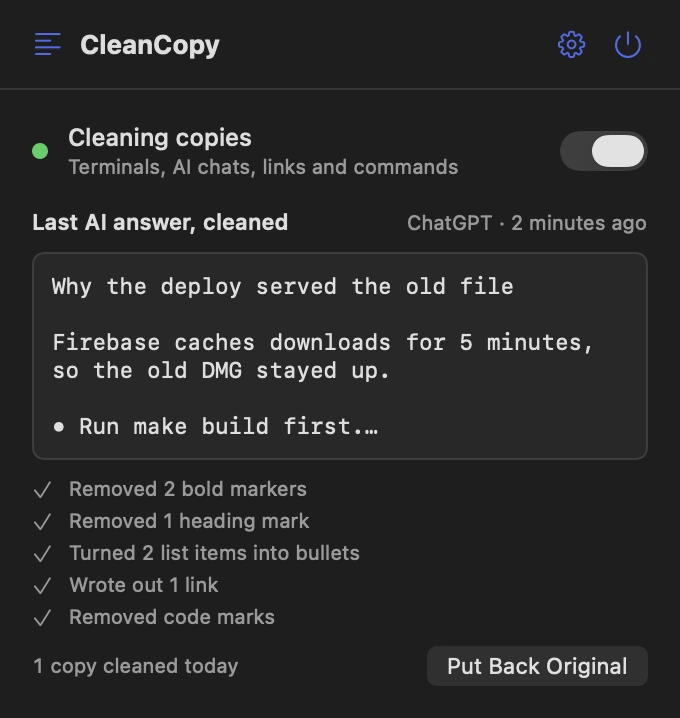
The panel shows your last cleaned copy and exactly what was removed: the margin from 6 lines, 248 trailing spaces, 1 marker, 2 wrapped lines rejoined.
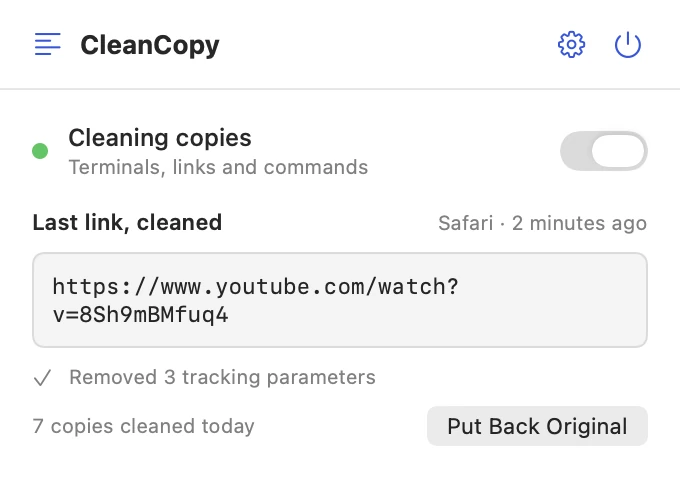
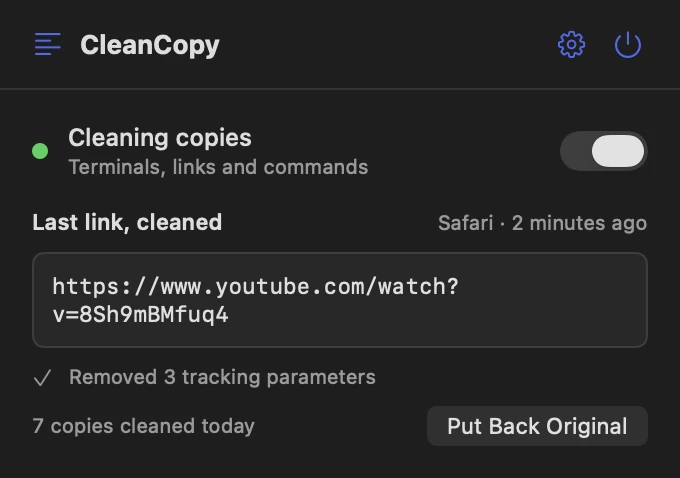
Links without the tracking
Copy a link anywhere and utm_ tags, click IDs and share IDs come off. Google and Outlook redirects unwrap, and Amazon links shrink to /dp/ID.
Commands that run
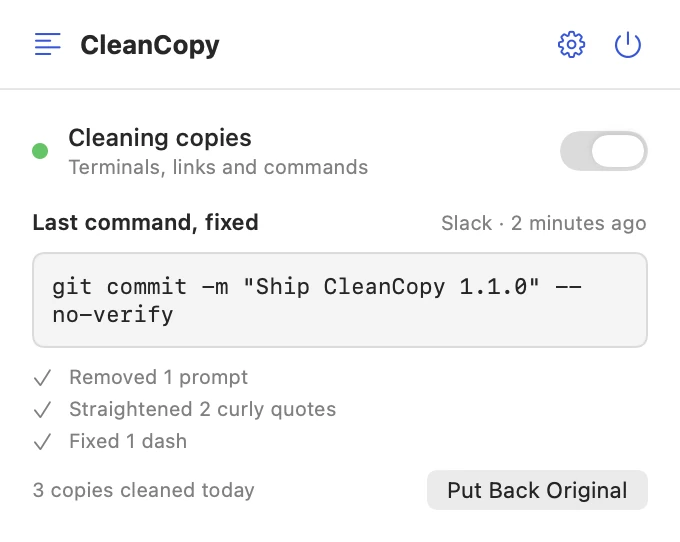
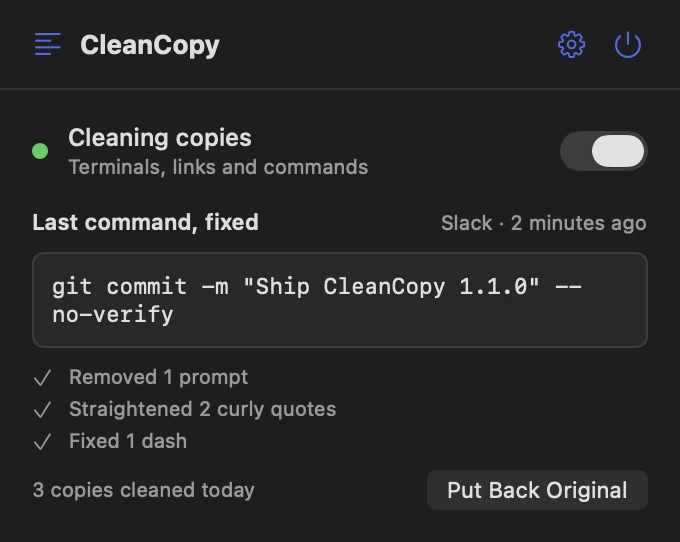
A command copied from Slack or a blog pastes with straight quotes, -- instead of —, and no $ prompt or invisible characters.
AI answers without the asterisks
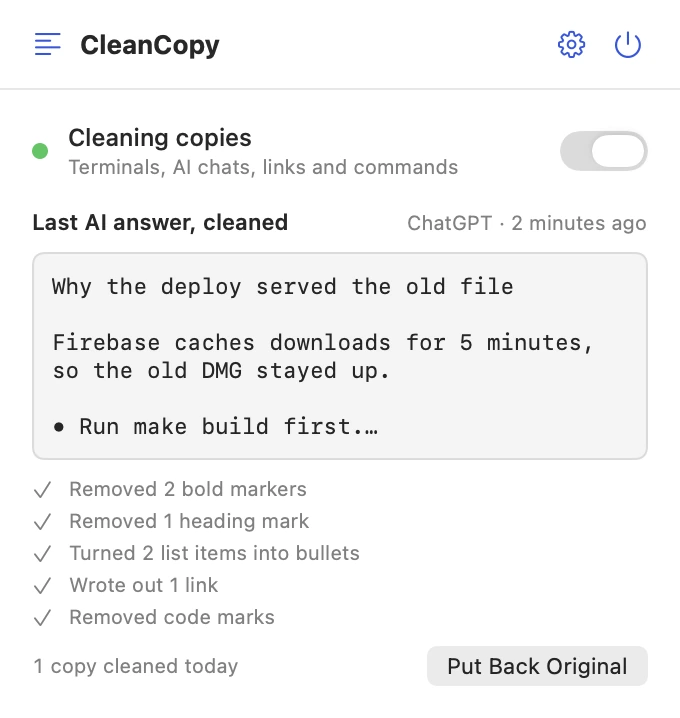
Copy an answer in the ChatGPT or Claude app and paste it into Mail or Slack: the **, ### and [link](…) marks are gone and lists get real bullets. Rich text stays for apps that use it, and code is left alone.
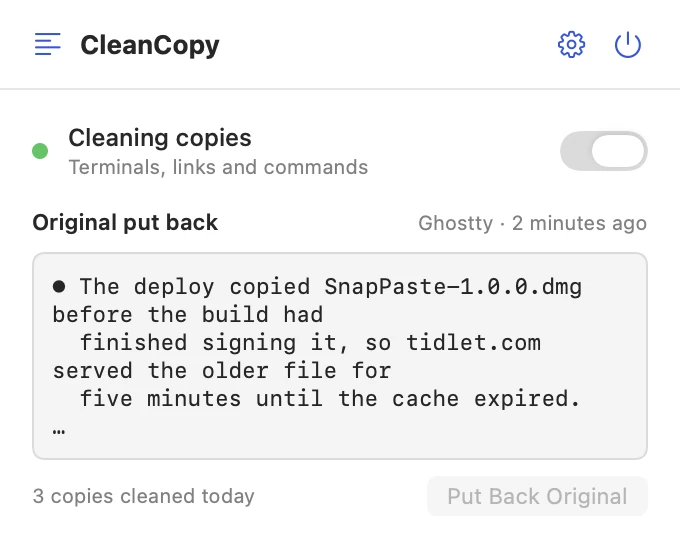
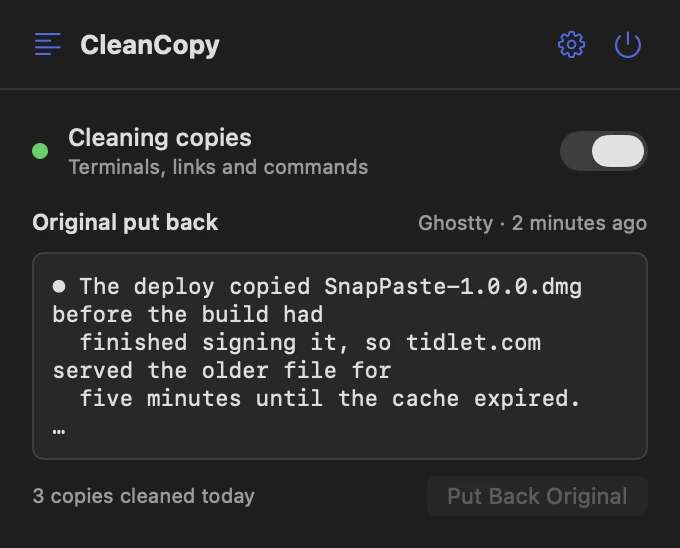
One click back
Put Back Original puts the text on your clipboard exactly as you copied it.
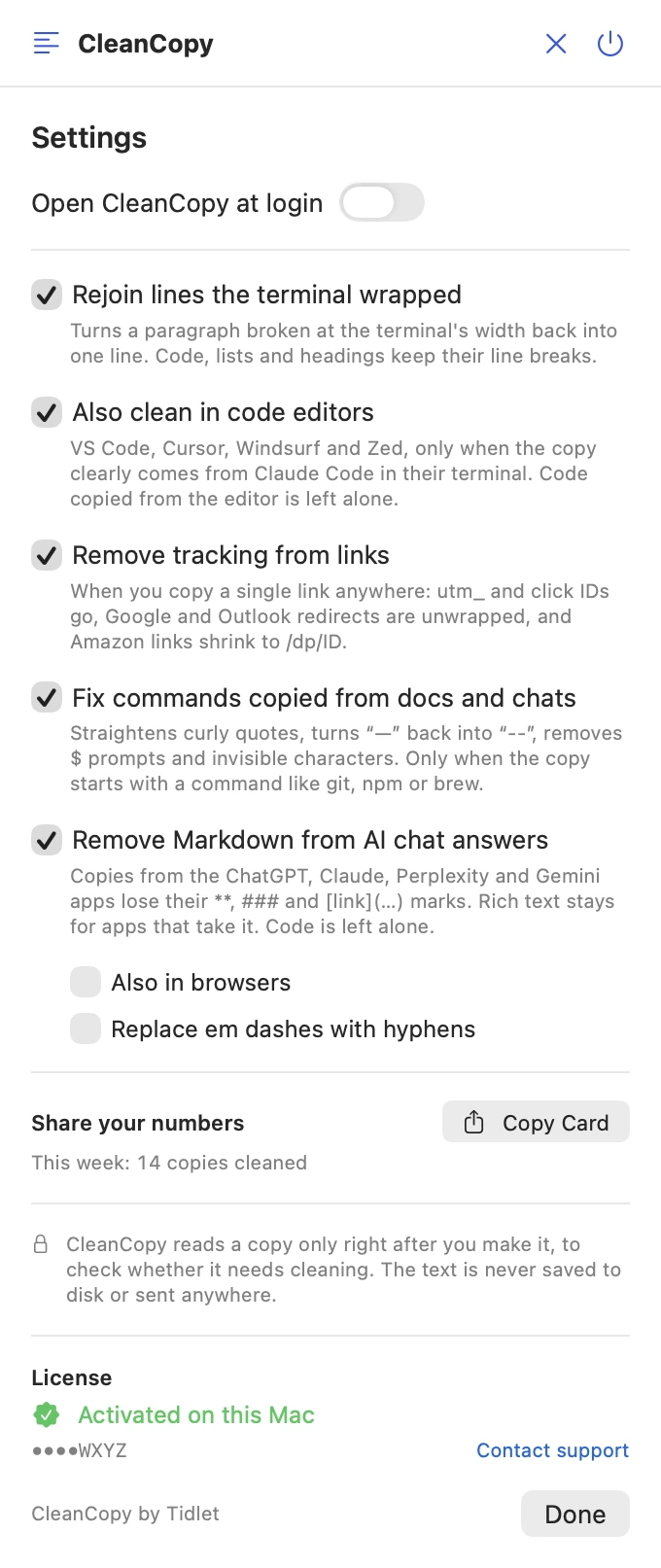
A switch for each fix
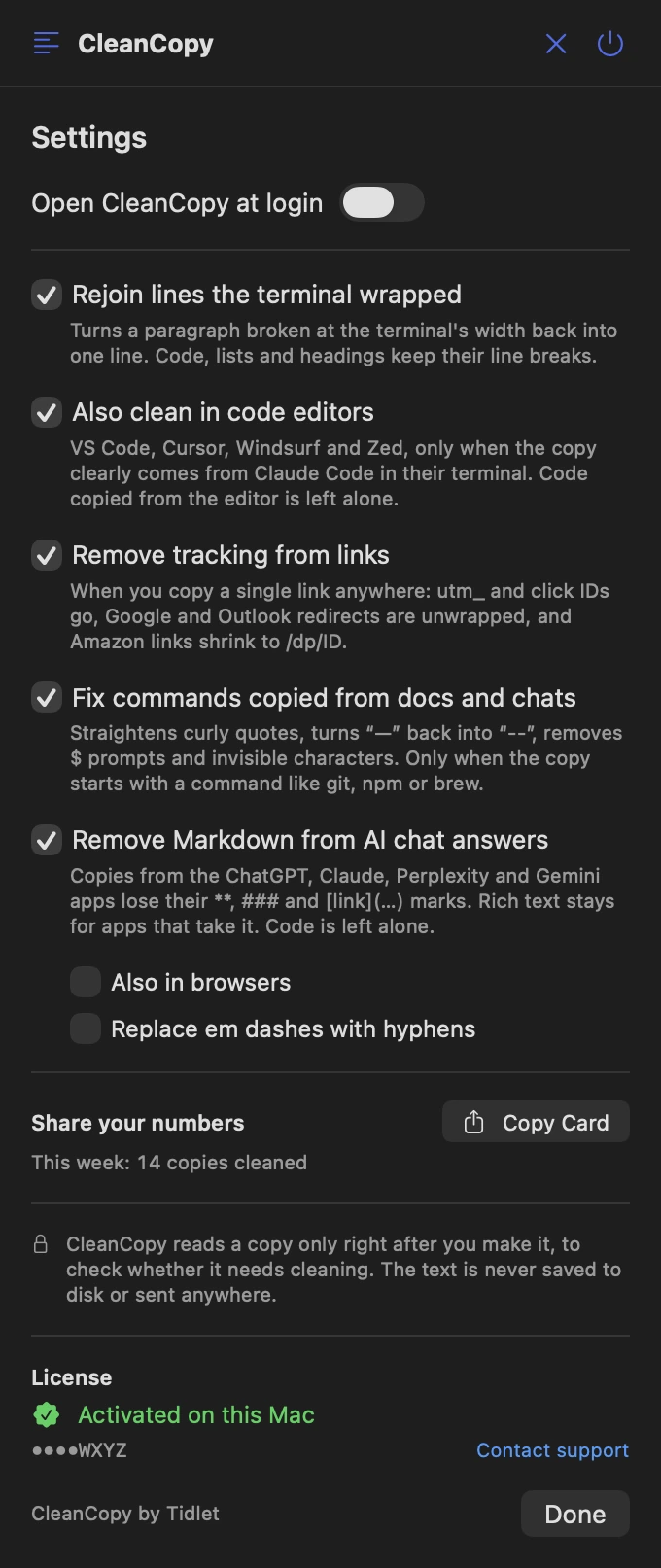
Rejoin wrapped lines, clean in code editors, remove tracking from links, fix commands, remove Markdown from AI answers. Each one yours to turn off, plus a card to share how many copies you've cleaned.
Features
Everything it does.
The full list fits on one screen.
Works as you copy
No shortcut to learn and no window to open. Copy with ⌘C as usual; the clean version is what you paste.
Claude Code, Codex and Gemini CLI
In a terminal it changes a copy only when it looks like their output. Code blocks keep their indent, and lists and tables keep their breaks. Your ls output stays as it is.
Links without tracking
When the whole copy is one link: utm_ tags, fbclid, gclid and share IDs go. Parameters a page needs, like ?v= or ?ref=main, stay.
Commands that run
Only when the copy starts with a command like git, npm or brew. Prose with curly quotes is left alone.
AI answers, minus the Markdown
Copies from the ChatGPT, Claude, Perplexity and Gemini apps lose their **, ### and [link](…) marks. Browsers too, if you turn it on.
One click back, no permissions
Put Back Original restores exactly what you copied. No Accessibility or Full Disk Access, and copies your password manager marks as concealed are never read.
Privacy
What CleanCopy sees, and what it sends.
The app has no analytics, ads or tracking. The full details are in our privacy policy.
What it reads
- Text you copy, right after you copy it, to check whether it's terminal output, a link or a command.
- Outside terminals and editors, only while macOS lets it read without asking, and only with the link, command or AI-answer fix on.
- The name of the app in front, to know where the copy came from.
What it sends
- Your license key, an activation ID and your Mac's name, to Dodo Payments, to check the key.
- Nothing else, ever.
What it never does
- Save your copied text to disk, or send it anywhere.
- Open the links you copy, or read copies marked concealed.
- Track how you use it.
Price
$9one time, all 9 tools
- CleanCopy and 8 more tools in one app, Tidlet.
- One payment of $9. No subscription.
- A license key by email, for 2 Macs.
- Refund within 14 days if it doesn't work on your Mac and we can't fix it.
- Help by email at hello@tidlet.com.
Also in Tidlet: DeskClean, ShotName, SnapPaste, TalkShare, SlideFind, PasteMask, HushMic and ClapRemote.



System requirements
- macOS
- 13 Ventura or later
- Chip
- Apple silicon and Intel (universal)
- Download
- Tidlet.dmg · 5.5 MB, all 9 tools
- Version
- Tidlet 1.0.4
- Permissions
- None
- Network
- License check only
- Terminals
- Terminal, iTerm2, Ghostty, Warp, WezTerm, kitty, Alacritty, Hyper, Tabby, Wave, Rio
- Editors
- VS Code, Cursor, Windsurf, Zed (terminal output only)
- Links and commands
- Any app (settings, both on)
- AI chat answers
- ChatGPT, Claude, Perplexity and Gemini apps (setting, on); browsers (setting, off)
What exactly does it remove?
The 2-space margin Claude Code draws, the spaces that pad each line to the terminal's width, the ⏺ and ⎿ markers (✦ for Gemini CLI, └ for Codex), box borders, line-number gutters, and line breaks the terminal added when a paragraph hit its edge. URLs cut at the edge are joined back without a space.
Will it change things I copy from my code?
No. In a code editor it acts only when the copy is clearly terminal output from one of these tools, and in a terminal only when it looks like it. Plain command output and code come through untouched.
Which links does it clean?
Any link, when the copy is just that link. It removes utm_ tags and click IDs (fbclid, gclid, msclkid and others), share IDs on YouTube, Spotify and X, unwraps Google, Outlook Safe Links, Facebook and LinkedIn redirects, and shortens Amazon product links. It never opens the link.
Why clean Markdown from ChatGPT?
ChatGPT and Claude put Markdown on the clipboard: **bold**, ### headings, - bullets. Mail, Slack and Messages paste those marks as they are. CleanCopy turns them into plain text with • bullets, keeps any rich text for apps that use it, and leaves code alone. In browsers it's off by default, because Markdown copied from GitHub or docs is usually meant.
Does it read everything I copy?
In a terminal or code editor, it reads each copy to check it. In other apps, only with the link, command or AI-answer fix on, and only while macOS lets it read without asking: if you set CleanCopy to Ask in Privacy & Security, it leaves other apps' copies alone rather than prompt you. Nothing is stored or sent; the last original is kept in memory for Put Back Original.
Is it safe to download?
Yes. The app is signed with our Apple Developer ID and notarized by Apple, which checks it for malware before it can open on your Mac.
Can I buy CleanCopy on its own?
CleanCopy comes in Tidlet, one menu bar app with all nine Tidlet tools. $9 unlocks every one of them; switch on CleanCopy and leave the rest off if you like.
Is there a free trial?
Yes. Every tool works for 3 days from the first launch, with no key and no account. The trial runs on your Mac and sends nothing. After that the tools pause until you enter a license key. If Tidlet doesn't work on your Mac and we can't fix it, we refund you within 14 days.
How many Macs can I use it on?
One key activates Tidlet on 2 Macs. New Mac? Email hello@tidlet.com with your receipt and we'll free a slot.
CleanCopy and 8 more, $9.
No subscription.
One key unlocks every Tidlet tool, on 2 Macs.